
Calibrated CommunicationCalibrated Communication
Buyer's guide, updated August 2026

Best sim racing venue software in 2026

Most software sold to sim venues is strong on one half of the job and quiet about the other. Some products book and take payment but never touch the simulator. Others run races and leaderboards beautifully and cannot take a booking at all. Below are the nine capabilities worth demanding, the questions that expose the gap, and an honest look at where each platform sits.

Live customer sites, running right now

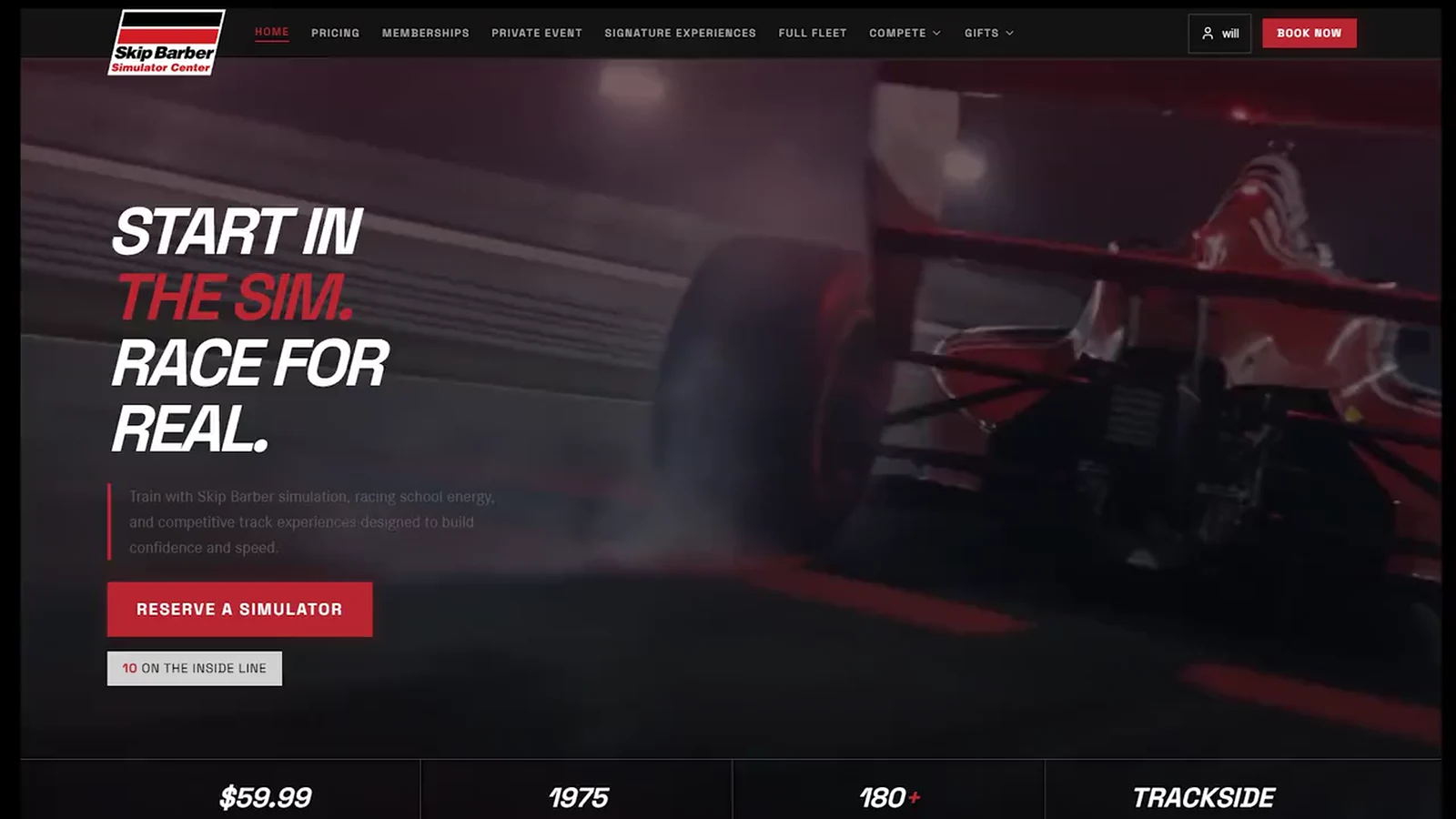
sim.skipbarber.com
Live Skip Barber sim racing booking site
Open sim.skipbarber.com

The nine capabilities that separate venue software from a booking tool

Take this list to any vendor, including this one. Eight of the nine run on this platform today at venues taking real bookings. The other is a question rather than a feature, and the honest answer here is on the list too.

Per-rig booking and walk-ins on one floor

Reservations and drop-ins share the same rigs. Every rig needs its own schedule, or the calendar stops reflecting what is actually free right now.

A party quote that answers the question on the spot

Several seats booked in one flow, held together, paid together. Two halves of this decide whether events earn anything. The enquirer should get a price while still on the page, with an honest figure for how many races each guest actually gets, because that figure drops as the group grows. Then whoever builds the real quote should be warned when the configuration wastes money, rather than quietly billing for it.

Waivers tied to the booking

Signed before anyone sits down, attached to the session, kept on file. If waivers live in a separate system, someone is chasing paper at the counter on a Saturday.

Memberships that apply themselves

Recurring plans whose perks land automatically at checkout. If a staff member has to remember the member rate, the member rate gets remembered wrong.

Point of sale on the same system

Sessions, add-ons and walk-in sales rung up on the system that already holds the bookings. Two systems means two sets of numbers that never quite agree.

Gift cards as a real revenue line

Sold online, redeemed against a session without staff intervention. For most venues this is a meaningful share of December.

A clear answer on who controls the simulator

Some platforms include an on-sim launcher, some do not, and this one does not. It matters because launchers are usually built around a single sim title. Ask which titles are supported before you let a launcher decide what your venue is allowed to run.

A booking that brings the next customer

The confirmation screen is the moment a customer is most excited, and almost every booking tool spends it saying thank you. Here it offers a challenge link carrying the session they just booked. They post it, a friend opens it, and the friend books the same slot to race them. One booking becomes two, and the venue fills a seat it never had to sell. Ask every vendor what their confirmation page does besides confirm.

One customer identity across all of it

The same person across bookings, memberships, waivers, gift cards and the counter. Without it you do not have a customer list, you have five of them.

What "warns you before you quote" actually looks like

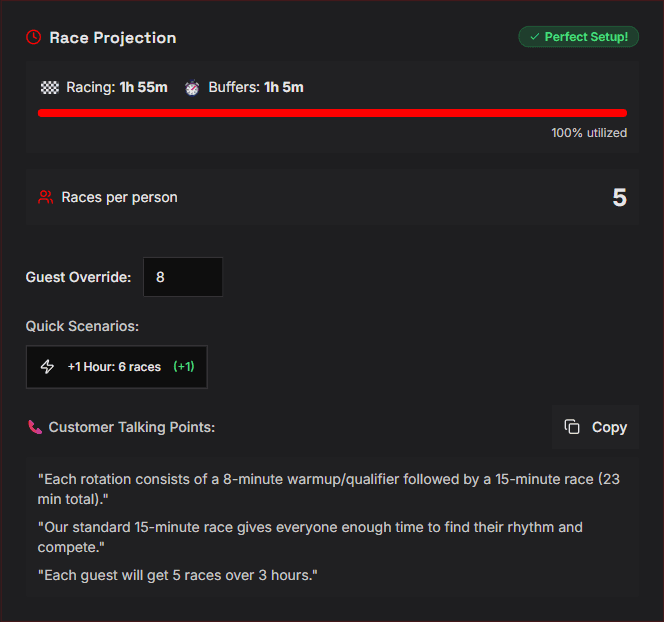
Two screens from the quote builder on a live venue. The first is the software arguing against its own invoice: eight guests spread across twelve rigs leaves four idle every heat, so it says to sell fewer rigs. The second is what the operator reads out on the call, with the races per guest worked out rather than guessed.

Quote builder warning that eight guests on twelve simulators leaves four rigs idle every heat, advising the operator to sell fewer rigs for a lower cost
The warning fires while the quote is being built, not after the event disappoints.
Race projection panel showing racing time, buffer time, utilisation, races per person, and auto-drafted customer talking points
Races per guest, a one-hour what-if, and the talking points already written for the call back.

The part owners actually watch: the money

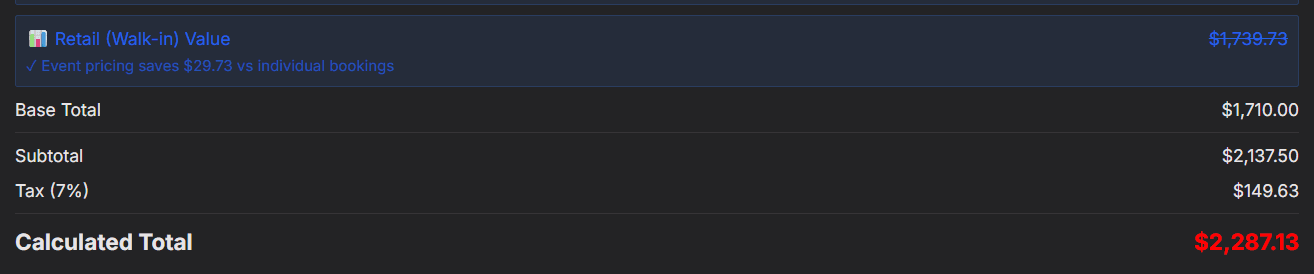
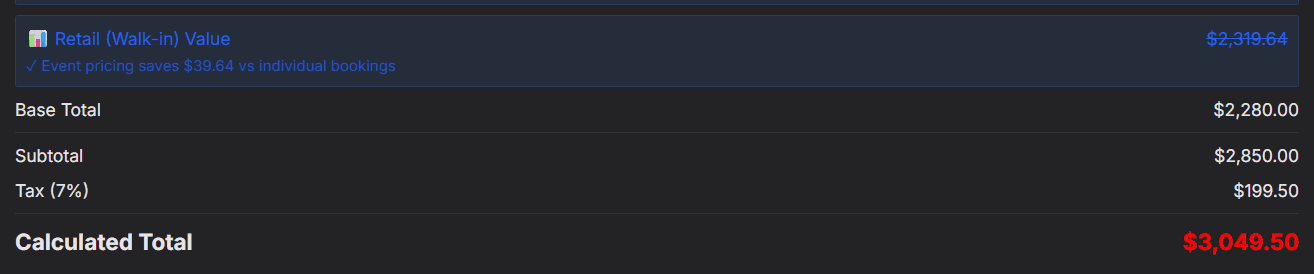
Every capability above is a means to this. The same quote at three hours and at four, with nothing else touched. The total moves, and so does what the guest gets for it, which is the argument the operator makes on the phone. A quote tool that only moves the price gives them half a sentence.

Quote totals for a three hour event, showing retail walk-in value struck through, base total, subtotal, tax and a calculated total
Three hours. Retail walk-in value struck through, so the operator can show the event is the cheaper way to buy the same racing.
The same quote at four hours, with every total recalculated
One hour added. Every figure recalculates, and races per guest goes from five to six.

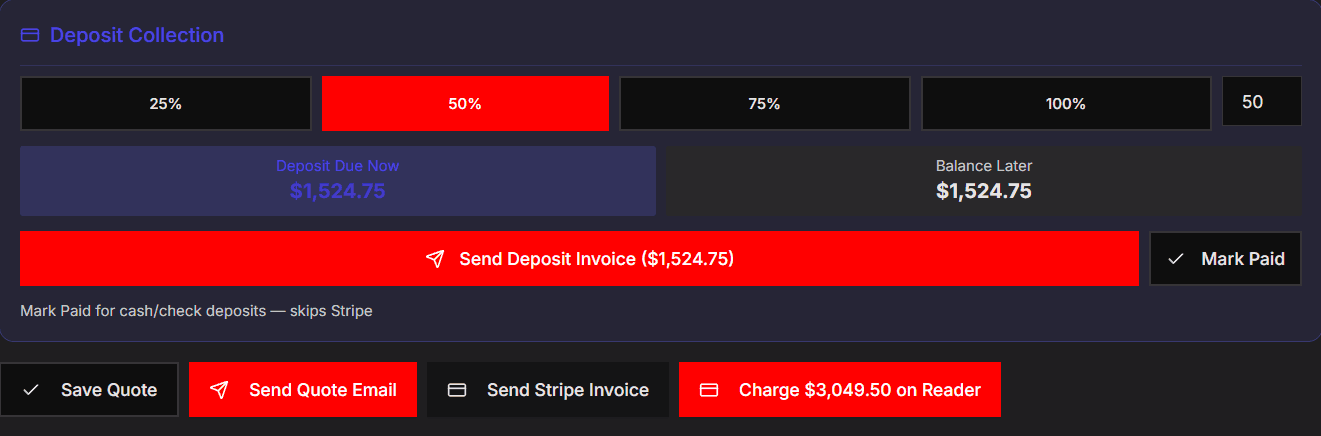
Then the quote has to turn into money. A deposit split with the balance held for later, an invoice the customer pays from a link without anyone chasing a card over the phone, a way to mark a cash or cheque deposit without pretending it went through the card processor, and a saved quote that survives the follow-up call. Ask a vendor to show this screen rather than describe it.

Deposit collection with preset percentages, deposit due now against balance later, send deposit invoice, mark paid for cash or cheque, and buttons to save the quote, email it, send a card invoice or charge in person
Deposit, balance, payment link, cash fallback and in-person charge, on one row.

The question most buyers forget: who does the setup?

Self-guided onboarding sounds like a feature and reads like one on a pricing page. What it means in practice is that you configure your own venue. Your rigs, your bays, your session lengths, your pricing tiers, your membership perks, your waiver text, typed in by the person who is also trying to open a business. The software is live on day one. Your venue is live whenever you finish.

The alternative is that it arrives built. That is the model here: the configuration is done for you and handed over working, on your own domain, under your own brand, with your real inventory in it. It is a different trade, and it is the one worth asking every vendor about before you compare anything else.

How the two models compare

What to compareBuilt for youSelf-guided setup
Who builds the venue configurationWe do. Rigs, bays, session lengths, pricing, memberships and waivers are configured for you.You do. Self-guided onboarding hands you a login and a blank system.
State on day oneLive with your real inventory loaded and bookable.Live once you have finished entering it.
Whose brand the customer seesYours, on your own domain.Varies. Some platforms book on their domain, under their brand.
Who owns the customer relationshipYou. The customer list is yours and stays yours.Worth asking directly, in writing, before you sign.
Which sim titles you are allowed to runAny of them. The operations layer does not touch the rig, so your title choice stays yours.Where an on-sim launcher is included, it is often built for one title.

Deliberately absent: a price row. Vendors change pricing often enough that any table here would be wrong within a month, and the number is rarely what decides this. For a vendor-by-vendor look at who actually does what, see the platform comparison.

Run by real venues

This is not a pitch deck. The Skip Barber Racing School runs its Long Island sim center on it. Speed Experience, a sim racing and track-day venue in Bavaria, runs its whole booking and events operation on it too. Real floors, one platform, each branded as their own.

Open the live builds and book a session yourself

The Skip Barber model

You do not have to build software to open a sim venue. Skip Barber did not. They run their sim center on this platform, branded as theirs. You license the platform, we configure it for your venue, and you launch on software that live venues already proved out. What that looks like for your specific build is a short conversation, not a checkout page.

Common questions

Can I just use Calendly, Mindbody or Square Appointments?

You can take a reservation with them. What they do not model is a floor of rigs turning over in short sessions, walk-ins and reservations competing for the same seats, group bookings, waivers attached to a session, and a counter. Most venues start there and move once parties and memberships get real.

What actually separates sim racing venue software from tour and activity booking software?

Tour and activity platforms model a departure with a headcount. A sim venue is per-rig inventory with turnover, plus memberships, plus a retail counter, plus on-sim control. The booking half is the part that looks similar and the operations half is where the difference shows up.

Does every platform control the simulator itself?

No, and this is the biggest hidden difference in the category. Some products are booking and payments only. Others are race control and leaderboards with no booking or payments at all. This platform is the operations layer and does not run the simulator, which is deliberate: it means no launcher dictates which sim titles your venue can run. Where a launcher is included by another vendor, ask specifically which titles it supports, because support is usually narrower than the marketing implies.

Can customers get an instant quote for a private party or corporate event?

On this platform the enquiry returns a price while the group size and length are still being set, along with an honest estimate of how many races each guest gets at that size, which is the number that decides whether the party lands well. The fuller feasibility check sits with the operator in the quote builder, where it flags a configuration that leaves rigs idle, projects races per person, and drafts the talking points for the follow-up call. Worth asking every vendor whether their event flow returns a price or a promise to get back to you.

How much does it cost?

Setup is quoted per venue, because we build it for you rather than hand you a login. Ongoing pricing is based on the revenue the platform generates rather than a fixed monthly fee, so it scales with the venue instead of charging a quiet venue the same as a busy one.

How long does it take to go live?

It depends on the size of the build and how much of your existing setup carries over. That is a short conversation rather than a number on a page, and you can see finished examples running before you commit to anything.

See it running on your brand

Book a call and I will build a clickable version of the platform on your venue's brand before you commit to anything.